

Capture
Capture
Capture
Capture
Capture
version 2.02
version 2.02
version 2.02
version 2.02
version 2.02
Info and Download
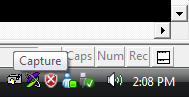
Capture is a quick-and-easy screen capture utility for Windows (and NT), which allows you to capture the entire screen, at any color depth and resolution, and save it into a Bitmap file for editing. If you are interested in only capturing one window, you can select to capture the active application window only, to save time editing screenshots! Capture runs on the Windows Tray (the lower right corner), and takes a screen capture every time you left click on the picture of a camera (please cut me some slack on the icon, I'm a musician, not an artist, and it was late), and a bitmap will be saved into the directory Capture is running from. You can take as many captures as you want, limited only by your imagination, and harddrive space. To exit Capture, just right click on it, and select 'Exit'; it's just that simple.
Capture works on all versions of Windows, from Window 95 to Windows 7 and everything inbetween (including XP, Vista, Win2k, etc). If you have a general question related to any of the programs on the site, or would like some additional info related to the downloads in general, then check out the downloads FAQ.
Capture works on all versions of Windows, from Window 95 to Windows 7 and everything inbetween (including XP, Vista, Win2k, etc). If you have a general question related to any of the programs on the site, or would like some additional info related to the downloads in general, then check out the downloads FAQ.
 v2.02 338k
History
v2.02
Rebuilt and fixed Vista issues
v2.01
Fixed minor error with directory selection
v2.00
HotKey, directory specification, capture notification and more!
v1.27
Active capture now sets window back to active state
v1.25
Now can set active or desktop capture to left-click mode
v1.20
Minor internal changes, installer support, and saving of settings
v1.17
Added saving clips to either files or clipboard
v1.16
Fixed problem with owner-drawn dialogs
v1.15
Fixed problem handling partially offscreen windows
v1.10
Added capture of active app only
v0.80
Initial Release
Last updated on Tuesday, March 9, 2021 12:24:49 PM PST. AnalogX trade is a registered trademark of AnalogX, LLC. All other trademarks are the sole property of their respective owners. All contents copyright ©1998-2009, AnalogX. All rights reserved.